General
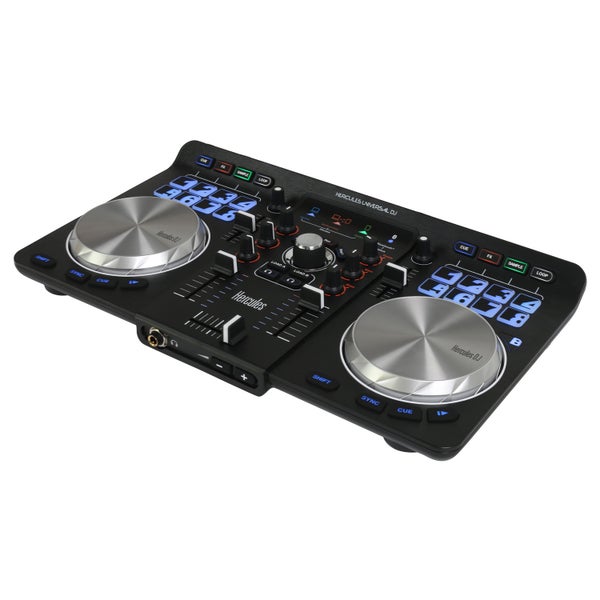
With the Hercules Universal DJ controller, parties get a whole new dimension because there aren't many DJ controllers that are as flexible and versatile as this one. You can use this two-deck controller in three different ways. Firstly, you can connect it to a PC/Mac (laptop or desktop computer) via the accessory USB cable, and use the DJUCED software that's also included. Plug a set of speakers into the RCA outputs, plug a set of headphones into the connector on the front, and you're good to go. It's also possible to use it wirelessly via iOS/Android.
Hercules Universal DJ Controller: PC, Mac, tablet and smartphone
The second mode of the Universal DJ controller, which can be selected via a switch at the back, allows you to use a PC/Mac and an iOS/Android device at the same time. In that case, the mobile iOS/Android device will function, in combination with the free-of-charge DJUCED Master app, as an extension piece of the laptop. You can, for instance, walk into the audience with your tablet or smartphone and control the various functions at a distance, via Bluetooth. The third mode focuses on use via Bluetooth with only an iOS/Android tablet, and in that case, the DJUCED app will be used.
Jogwheels, pads and buttons
It doesn't matter which combination of devices you use, the possibilities are endless. Each deck features a touch-sensitive jog wheel with a metal surface. Not only does each deck contain a mixer section (with 3-band EQ, volume and pitch faders), but also a total of eight backlit pads. Depending on the selected section, you can engage cues, apply effects, trigger samples, and select loop presets. The rotary knob can be used for setting the parameters. In the middle, you can find a practical browse button, a crossfader, charging buttons, and monitoring buttons.